
Recent Products Block
The Recent Products Block for WooCommerce is a block plugin that allows you to showcase your WooCommerce recently added products in block Widgets, or anywhere in the block editor area.
- 2+ 5 Rating
- 600+ Active Installs
- 14-day money-back guarantee

Why Choose Recent Products Block?
Display the latest WooCommerce products in a beautiful way.
The Problem with Traditional Product Layouts
- Limited design and layout flexibility
- Poor responsiveness across different devices
- Dependence on shortcodes or custom code
- Difficult to highlight newly added products effectively
- Inconsistent styling with modern Gutenberg layouts
The Better Way with Recent Products Block
- Fully integrated with the WordPress Gutenberg editor
- Display recently added WooCommerce products effortlessly
- Advanced query options (stock status, categories, filters, etc.)
- Responsive controls for desktop, tablet, and mobile
- No coding required – beginner-friendly setup
Gutenberg-First Product Display
Seamlessly integrates with the WordPress block editor, allowing you to add and customize recent WooCommerce products directly from Gutenberg without using shortcodes or custom code.

Advanced Product Query Control
Filter and display products by stock status, categories, or other query options to showcase exactly the products you want—perfect for promotions and new arrivals.

Fully Responsive Layouts
Control columns, rows, and spacing separately for desktop, tablet, and mobile devices to ensure a consistent and visually appealing product display on all screen sizes.

Element Visibility & Styling Options
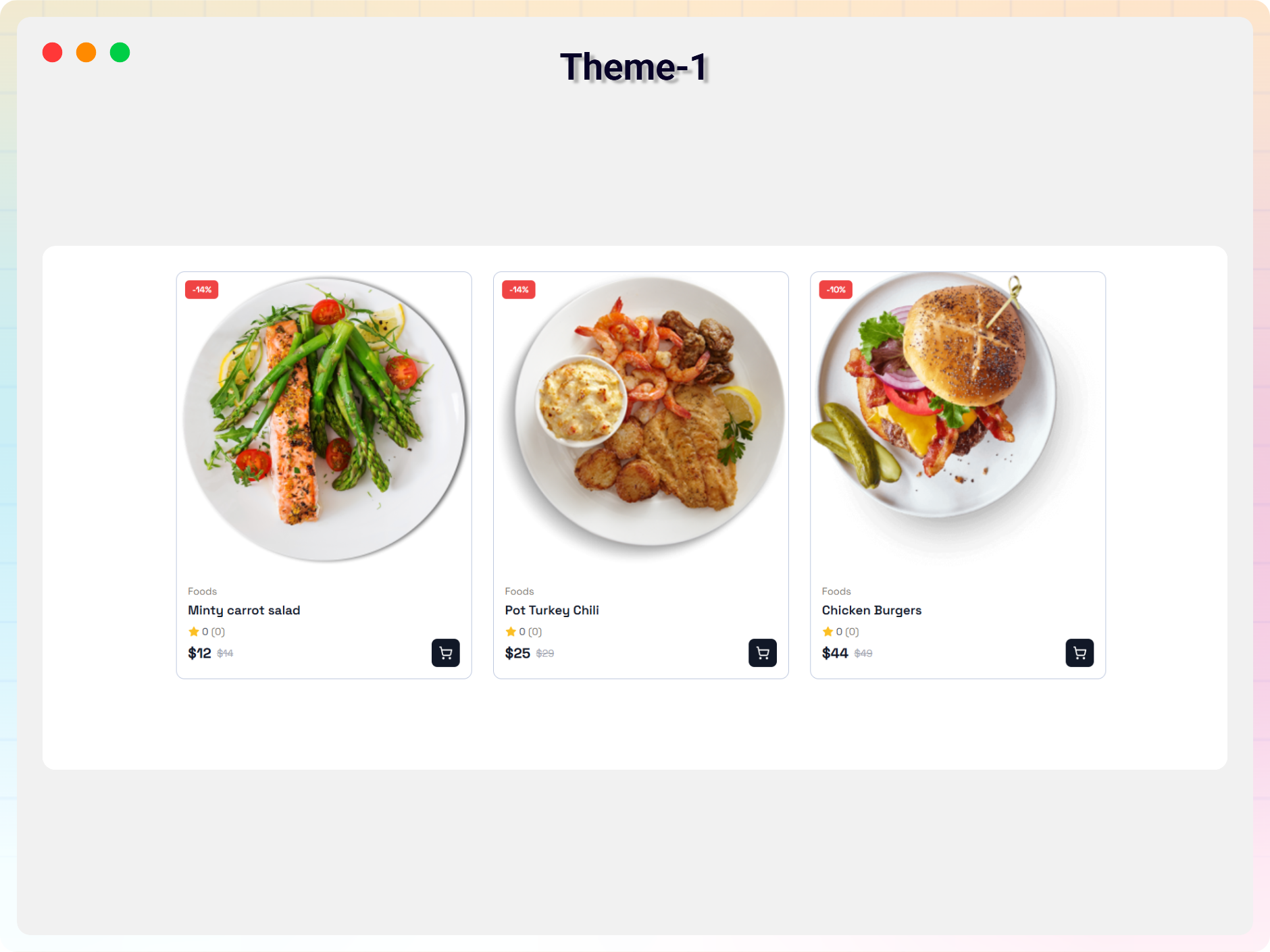
Show or hide product elements such as image, title, price, rating, and add-to-cart button, with flexible styling controls to match your store’s design.

Smarter Video Player That Looks Great and Just Works
-
Universal Block & Shortcode Support
Use the Gutenberg block or shortcodes to display products anywhere. Fully compatible with all WordPress themes and page builders.
-
Advanced Product Query Controls
Filter products by stock status, categories, and other query options to showcase exactly the products you want.
-
Responsive Layout Management
Set different columns, rows, and spacing for desktop, tablet, and mobile devices for a fully responsive design.
-
Ready-Made Templates
Choose from professionally designed templates to create beautiful product layouts quickly and easily.
-
Element Visibility Control
Show or hide product elements such as image, title, price, rating, review count, and add-to-cart button.
-
Price & Discount Display Options
Manage product price visibility and highlight discounts with customizable discount tags.
-
Typography & Color Customization
Customize fonts, font sizes, colors, and hover effects to match your store branding.
-
Product Card Styling
Control background, padding, border radius, and shadow options for modern product cards.
-
Image Customization Options
Adjust image width, height, alignment, and object-fit settings for consistent product images.
-
Section Styling Controls
Customize section padding, margin, and background to fit perfectly within your page layout.
-
Review Count & Rating Display
Display average ratings and review counts with flexible styling options to build customer trust.
-
Beginner-Friendly & Performance Optimized
Easy to use, lightweight, and optimized for speed without affecting website performance.
Testimonials
What Our Customers Say to Us
3.7 rating · 3 real reviews from the WordPress.org community
-
WordPress.org
First contact and I am fully pleased!
Absolutely impressed with this plugin! Not only is it incredibly user-friendly, but the code quality is top-notch. Integrating it seamlessly into the stylesheet of any theme was a breeze. Highly recommend for anyone looking for a hassle-free solution which provides excellent usability.
xninedesign Read review
-
WordPress.org
Better than WooCommerce’s Recent Products Block
WooCommerce’s block adds a background of white behind its text, or (if you choose not to have text,) a strip of blank white below the image, disrupting any background other than #FFF. This block does not do that. It is straightforward to use and, so far, effective. This was a fine effort and resulted in a solid, basic, product which does exactly what it claims to do.
jlking3 Read review
Screenshots
Explore the Interface, Settings & Preview Screens


FAQs
Frequently Asked Questions
No. The plugin is completely beginner-friendly and works directly inside the WordPress block editor without requiring any coding skills.
Yes. The plugin is designed to be compatible with all properly coded WordPress themes and page builders.
Yes. You can use universal shortcodes to display recent products in classic editor, widgets, or any page builder.
Absolutely. You can control columns, spacing, and layout settings separately for desktop, tablet, and mobile devices.
Yes. You can easily show or hide product elements such as image, title, price, rating, review count, and add-to-cart button.
Yes. You can filter products by stock status, categories, and other query options to display specific products.
The Pro version includes ready-made templates, advanced styling options, price and discount controls, typography settings, and more customization features.
No. The plugin is lightweight and optimized for performance to ensure fast loading times.
You can get support through the WordPress.org support forum or the plugin’s official support channel.
Get started
Ready to get more from Recent Products Block?
600+ WordPress sites already run Recent Products Block. Start free, then upgrade to Pro when you want the full toolkit.

 35% OFF